
What Is POS Software and What Are Its Benefits?
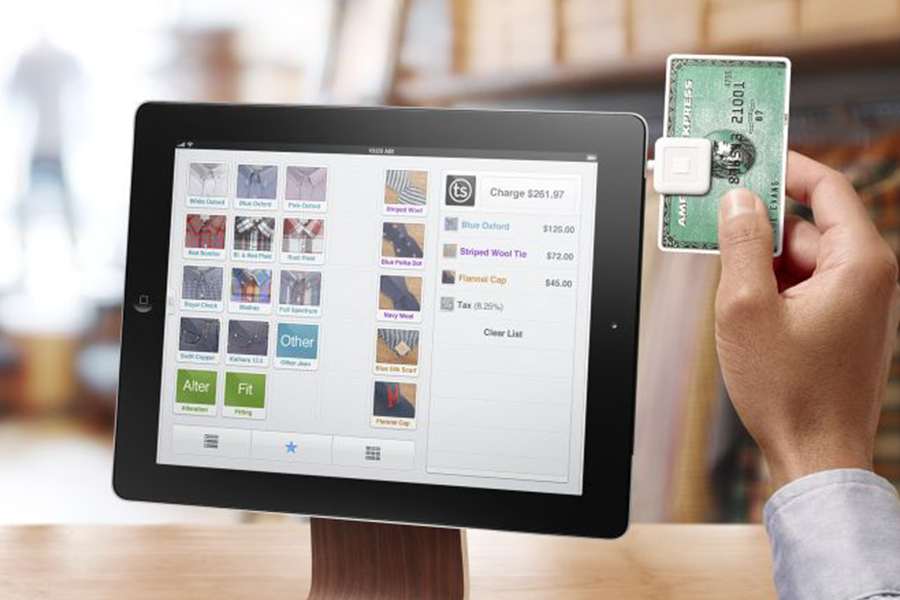
Point-of-sale software manages the moment when a customer selects products or services, the business calculates the amount due, and payment is completed. Modern POS systems can also connect sales with inventory, customers, employees, purchasing, accounting, and reporting.
A POS may run on a countertop terminal, computer, tablet, or mobile device. Cloud-based systems can synchronize information across branches and approved online channels, while locally installed systems may operate on business-managed infrastructure.
How a POS Transaction Works
An employee scans a barcode, searches for an item, or selects a service. The system applies the price, quantity, discounts, and applicable taxes. The customer pays using an accepted method, and the system records the sale and produces a receipt or invoice.
Integrated inventory quantities and financial records may update automatically. Returns, exchanges, voids, and discounts should follow controlled permissions and leave an audit history.
Key Benefits of POS Software
Better Inventory Management
Stock quantities can update after sales, purchases, returns, and transfers. Reorder levels and movement reports help businesses avoid shortages and excess inventory.
Faster Checkout
Barcode scanning, saved product information, and automatic calculations reduce transaction time and manual entry. Faster service can shorten queues and improve customer experience.
Accurate Pricing and Discounts
Prices and promotion rules are maintained centrally, reducing reliance on memory or manual calculations. Authorized users can schedule offers and define conditions.
Simpler Invoicing and Receipts
The system records transaction details and generates consistent receipts or invoices. Digital delivery may be offered when appropriate and permitted.
Customer Management
With suitable consent and privacy controls, businesses can maintain customer profiles, purchase history, and loyalty information. This supports relevant service and offers.
Sales Reporting
Reports show sales by product, category, employee, branch, payment method, period, or customer segment. Management can identify trends and evaluate performance.
Purchasing and Supplier Control
Integrated purchasing tools can create orders, receive goods, update costs, and track supplier balances. Reorder recommendations use current inventory and demand information.
Employee Management
POS systems may support user roles, shifts, clock-in records, sales attribution, and cash-drawer accountability. Employee privacy and labor requirements should be respected.
Accounting Integration
Sales, taxes, payments, costs, and inventory information can flow to accounting software. Integrations reduce duplicate entry but require monitoring and reconciliation.
POS Systems for Physical and Online Sales
A physical POS supports in-person transactions, while an online checkout handles digital orders. An integrated commerce system can synchronize products, prices, customers, orders, and inventory across both channels.
Businesses should define how returns, fulfillment, discounts, and customer data work across channels so the experience remains consistent.
Hardware Components
A POS setup may include a terminal, touchscreen, barcode scanner, receipt printer, cash drawer, customer display, scale, and payment device. Mobile businesses may use a tablet or smartphone with suitable accessories.
Hardware should fit transaction volume, environment, mobility, connectivity, and accessibility needs. Backup equipment and procedures may be needed for critical locations.
Payment and Security Considerations
Payment information is highly sensitive. Businesses should use approved payment devices and providers, keep software current, protect networks, restrict access, and follow applicable payment-security requirements.
Individual user accounts, strong authentication, least-privilege permissions, audit logs, backups, and monitoring protect sales and customer information. Staff should be trained to recognize suspicious activity.
Cloud-Based and On-Premises POS
Cloud POS systems commonly offer remote access, centralized updates, multi-location synchronization, and subscription pricing. They depend on reliable connectivity and the provider’s availability and security.
On-premises systems may provide more local control but require the business to manage servers, updates, backups, and remote access. Some solutions support offline operation with later synchronization.
How to Choose POS Software
Define requirements for products, services, branches, users, inventory, purchasing, invoicing, taxes, payments, loyalty, e-commerce, accounting, and reports. Include expected transaction volumes and future growth.
Evaluate usability, implementation, training, support, hardware compatibility, offline capability, security, data export, integrations, scalability, availability, and total cost. Ask vendors to demonstrate real scenarios including returns and exceptions.
Implementation Best Practices
Clean product, price, tax, supplier, and customer data before migration. Configure roles and approval limits, test devices and integrations, and reconcile opening inventory.
Train employees on sales, returns, cash handling, privacy, and outage procedures. After launch, review transaction exceptions, payment settlements, inventory differences, permissions, and reports.
Conclusion
POS software does more than accept payments. It connects checkout with inventory, customers, purchasing, employees, accounting, and business insight. A suitable, secure, and well-configured POS system can improve transaction speed, accuracy, stock control, customer service, and decision-making.
Comments
16 Jun 2023 06:04 PM
@shosho
معلومة رائعة للتجار
16 Jun 2023 06:06 PM
@z_f_s7296
شكرا على ما تقدمونه ❤
16 Jun 2023 06:09 PM
@m416_2
ممتاز مقال رائع
Add New Comment